Interface Specifications
The locations and specifications of each interface on the Dev Board are shown below.
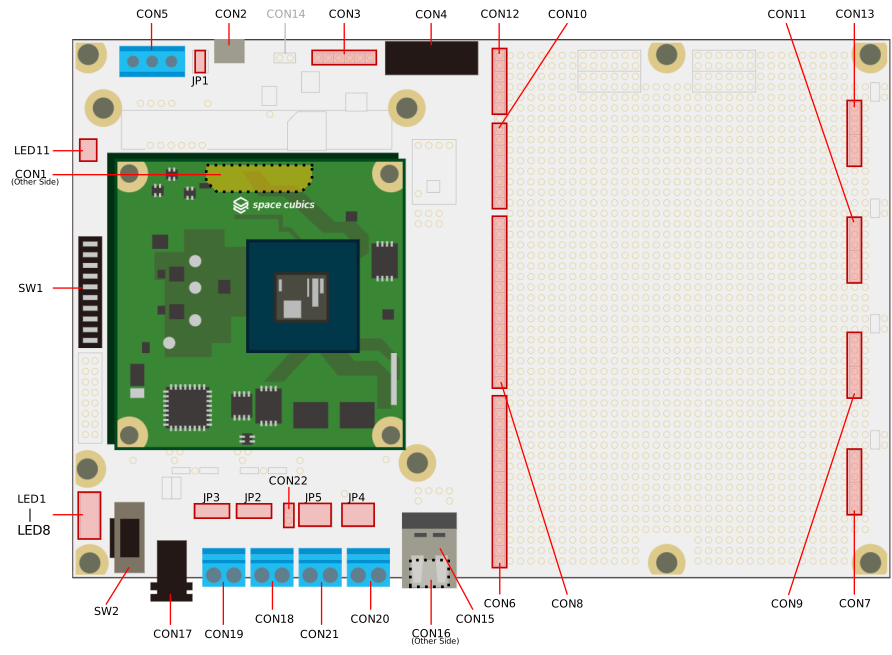
| Part Number | Interface Name | Form Factor | Remarks |
|---|---|---|---|
CON1 |
OBC Connection Interface |
Board-to-board connector 80-pin (0.5mm pitch) |
Mating cycles: 50 times |
CON2 |
DEBUG Interface |
USB Micro-B connector |
|
CON3 |
FPGA JTAG Interface |
6-pin pin header (2.54mm pitch) |
Connector not installed |
CON4 |
TRCH ICSP Interface |
Right-angle 8-pin pin socket (2.54mm pitch) |
|
CON5 |
CAN Interface |
3-pin terminal block (5.0mm pitch) |
|
CON6 |
UIO1 Interface |
16-pin pin socket (2.54mm pitch) |
Connector not installed |
CON7 |
UIO1 Power & GND Interface |
3-pin VDD pin socket, 3-pin GND pin socket (2.54mm pitch) |
Connector not installed |
CON8 |
UIO2 Interface |
16-pin pin socket (2.54mm pitch) |
Connector not installed |
CON9 |
UIO2 Power & GND Interface |
3-pin VDD pin socket, 3-pin GND pin socket (2.54mm pitch) |
Connector not installed |
CON10 |
UIO3 Interface |
8-pin pin socket (2.54mm pitch) |
Connector not installed |
CON11 |
UIO3 Power & GND Interface |
Pin Socket VDD3-pin, GND3-pin (2.54mm pitch) |
Connector not installed |
CON12 |
UIO4 Interface |
Pin Socket 6-pin (2.54mm pitch) |
Connector not installed |
CON13 |
UIO4 Power & GND Interface |
Pin Socket VDD3-pin, GND3-pin (2.54mm pitch) |
Connector not installed |
CON15 |
SC Bus Host Interface |
USB Type-A Connector |
|
CON16 |
SC Bus Device Interface |
USB Micro-B Connector |
|
CON17 |
Power Input Interface |
DC Jack |
Compatible Plug: 2.1mm diameter (center positive) |
CON18 |
Power Input Interface (VIN_A) |
Terminal Block 2-pin (5.0mm pitch) |
|
CON19 |
Power Input Interface (VIN_B) |
Terminal Block 2-pin (5.0mm pitch) |
|
CON20 |
Power Input Interface (VDD_UIO1) |
2-pin Terminal Block (5.0mm Pitch) |
|
CON21 |
Power Input Interfacee (VDD_UIO2) |
2-pin Terminal Block (5.0mm Pitch) |
|
CON22 |
Step-Down DC/DC Converter Output Interface |
2-pin Terminal Block (2.54mm Pitch) |
Connector not installed |
JP1 |
CAN Termination Resistor Switch Interface |
2-pin Terminal Block (2.54mm Pitch) |
|
JP2 |
Power Input Switch Interface (VIN_A) |
3-pin pin header (2.54mm pitch) |
|
JP3 |
Power Input Switch Interface (VIN_B) |
3-pin pin header (2.54mm pitch) |
|
JP4 |
Power Input Switch Interface (VDD_UIO1) |
6-pin pin header (2.54mm pitch) |
|
JP5 |
Power Input Switch Interface (VDD_UIO2) |
6-pin pin header (2.54mm pitch) |
|
SW1 |
User Switch |
DIP switch |
|
SW2 |
Main Power Input ON/OFF |
Slide switch |
|
LED1~8 |
Power LEDs |
LED (Yellow-green) |
|
LED11 |
User LED |
LED (Yellow-green) |
OBC Connection Interface (CON1)
CON1 is the connection interface to the OBC.
Installed Connector: AXK5S80047YG (Panasonic)
| Pin Number | Pin Name | I/O | Power Domain | Description |
|---|---|---|---|---|
1 |
VIN_A_P1 |
Power |
- |
OBC Main Power (A System) |
2 |
VIN_A_P2 |
Power |
- |
OBC main power supply (A system) |
3 |
VIN_A_P3 |
Power |
- |
OBC main power supply (A system) |
4 |
ULPI_DP |
In/Out |
- |
SC Bus D+ signal |
5 |
ULPI_DM |
In/Out |
- |
SC Bus D- signal |
6 |
GND |
Power |
- |
Power supply (GND) |
7 |
UIO1_00 |
In/Out |
VDD_UIO1 |
UIO1 Bit 0 signal |
8 |
UIO1_01 |
In/Out |
VDD_UIO1 |
UIO1 Bit 1 signal |
9 |
UIO1_02 |
In/Out |
VDD_UIO1 |
UIO1 Bit 2 signal |
10 |
UIO1_03 |
In/Out |
VDD_UIO1 |
UIO1 Bit 3 signal |
11 |
UIO1_04 |
In/Out |
VDD_UIO1 |
UIO1 Bit 4 signal |
12 |
UIO1_05 |
In/Out |
VDD_UIO1 |
UIO1 Bit 5 signal |
13 |
UIO1_06 |
In/Out |
VDD_UIO1 |
UIO1 Bit 6 signal |
14 |
UIO1_07 |
In/Out |
VDD_UIO1 |
UIO1 Bit 7 signal |
15 |
GND |
Power |
- |
Power Supply (GND) |
16 |
UIO1_08 |
In/Out |
VDD_UIO1 |
UIO1 Bit 8 signal |
17 |
UIO1_09 |
In/Out |
VDD_UIO1 |
UIO1 Bit 9 signal |
18 |
UIO1_10 |
In/Out |
VDD_UIO1 |
UIO1 Bit 10 signal |
19 |
UIO1_11 |
In/Out |
VDD_UIO1 |
UIO1 Bit 11 signal |
20 |
UIO1_12 |
In/Out |
VDD_UIO1 |
UIO1 Bit 12 signal |
21 |
UIO1_13 |
In/Out |
VDD_UIO1 |
UIO1 Bit 13 signal |
22 |
UIO1_14 |
In/Out |
VDD_UIO1 |
UIO1 Bit 14 signal |
23 |
UIO1_15 |
In/Out |
VDD_UIO1 |
UIO1 Bit 15 signal |
24 |
GND |
Power |
- |
Power Supply (GND) |
25 |
UIO3_00 / UIIO4_06 |
In/Out |
VDD_3V3_SYS / VDD_3V3_IO[1] |
UIO3 Bit 0 Signal. Connection can be changed to UIO4 Bit 6 Signal via hardware option. |
26 |
UIO3_01 / UIIO4_07 |
In/Out |
VDD_3V3_SYS / VDD_3V3_IO[1] |
UIO3 Bit 1 signal. Connection can be changed to UIO4 Bit 7 signal via hardware option. |
27 |
UIO3_02 / UIIO4_08 |
In/Out |
VDD_3V3_SYS / VDD_3V3_IO[1] |
UIO3 Bit 2 signal. Connection can be changed to UIO4 Bit 8 signal via hardware option. |
28 |
UIO4_00 |
Input |
VDD_3V3_IO |
UIO4 Bit 0 signal |
29 |
GND |
Power |
- |
Power Supply (GND) |
30 |
TRCH_UART_TX / UIO4_09 |
Input |
VDD_3V3_SYS / VDD_3V3_IO[1] |
TRCH UART TX signal. Connection to UIO4 Bit 9 signal can be changed via hardware option. |
31 |
TRCH_UART_RX / UIO4_10 |
Output |
VDD_3V3_SYS / VDD_3V3_IO[1] |
TRCH UART RX signal. Connection can be changed to UIO4 Bit 10 signal via hardware option. |
32 |
VDD_3V3_SYS |
Power |
- |
3.3V power supply from OBC (VDD_3V3_SYS) |
33 |
GND |
Power |
- |
Power Supply (GND) |
34 |
I2C_EXT_SCL |
Input |
VDD_3V3_SYS |
External I2C SCL signal |
35 |
I2C_EXT_SDA |
In/Out |
VDD_3V3_SYS |
External I2C SDA signal |
36 |
WDOG_OUT / UIO4_11 |
Input |
VDD_3V3_SYS / VDD_3V3_IO[1] |
Watchdog input signal. Connection can be changed to UIO4 Bit 11 signal via hardware option. |
37 |
VDD_3V3_IO_P37 |
Power |
- |
3.3V power from OBC (VDD_3V3_IO) |
38 |
VDD_3V3_IO_P38 |
Power |
- |
3.3V power from OBC (VDD_3V3_IO) |
39 |
VDD_UIO1_P39 |
Power |
- |
Power supply for UIO1 (VDD_UIO1) |
40 |
VDD_UIO1_P40 |
Power |
- |
Power supply for UIO1 (VDD_UIO1) |
| Pin Number | Pin Name | I/O | Power Domain | Description |
|---|---|---|---|---|
41 |
VDD_UIO2_P41 |
Power |
- |
Power supply for UIO2 (VDD_UIO2) |
42 |
VDD_UIO2_P42 |
Power |
- |
Power supply for UIO2 (VDD_UIO2) |
43 |
UIO4_05 |
In/Out |
VDD_3V3_IO |
UIO4 Bit 5 signal |
44 |
UIO4_04 |
In/Out |
VDD_3V3_IO |
UIO4 Bit 4 signal |
45 |
UIO4_03 |
In/Out |
VDD_3V3_IO |
UIO4 Bit 3 signal |
46 |
UIO4_02 |
In/Out |
VDD_3V3_IO |
UIO4 Bit 2 signal |
47 |
UIO4_01 |
In/Out |
VDD_3V3_IO |
UIO4 Bit 1 signal |
48 |
GND |
Power |
- |
Power Supply (GND) |
49 |
ICSP_PGD |
In/Out |
VDD_3V3_SYS |
TRCH PGD signal |
50 |
ICSP_PGC |
In/Out |
VDD_3V3_SYS |
TRCH PGC signal |
51 |
ICSP_MCLR_B |
Output |
VDD_3V3_SYS |
TRCH MCLR_B signal |
52 |
GND |
Power |
- |
Power Supply (GND) |
53 |
FPGA_TCK |
Output |
VDD_3V3_IO |
FPGA JTAG TCK signal |
54 |
FPGA_TDO |
Input |
VDD_3V3_IO |
FPGA JTAG TDO signal |
55 |
FPGA_TDI |
Output |
VDD_3V3_IO |
FPGA JTAG TDI signal |
56 |
FPGA_TMS |
Output |
VDD_3V3_IO |
FPGA JTAG TMS signal |
57 |
GND |
Power |
- |
Power Supply (GND) |
58 |
UIO2_15 |
In/Out |
VDD_UIO2 |
UIO2 Bit 15 signal |
59 |
UIO2_14 |
In/Out |
VDD_UIO2 |
UIO2 Bit 14 signal |
60 |
UIO2_13 |
In/Out |
VDD_UIO2 |
UIO2 Bit 13 signal |
61 |
UIO2_12 |
In/Out |
VDD_UIO2 |
UIO2 Bit 12 signal |
62 |
UIO2_11 |
In/Out |
VDD_UIO2 |
UIO2 Bit 11 signal |
63 |
UIO2_10 |
In/Out |
VDD_UIO2 |
UIO2 Bit 10 signal |
64 |
UIO2_09 |
In/Out |
VDD_UIO2 |
UIO2 Bit 9 signal |
65 |
UIO2_08 |
In/Out |
VDD_UIO2 |
UIO2 Bit 8 signal |
66 |
GND |
Power |
- |
Power Supply (GND) |
67 |
UIO2_07 |
In/Out |
VDD_UIO2 |
UIO2 Bit 7 signal |
68 |
UIO2_06 |
In/Out |
VDD_UIO2 |
UIO2 Bit 6 signal |
69 |
UIO2_05 |
In/Out |
VDD_UIO2 |
UIO2 Bit 5 signal |
70 |
UIO2_04 |
In/Out |
VDD_UIO2 |
UIO2 Bit 4 signal |
71 |
UIO2_03 |
In/Out |
VDD_UIO2 |
UIO2 Bit 3 signal |
72 |
UIO2_02 |
In/Out |
VDD_UIO2 |
UIO2 Bit 2 signal |
73 |
UIO2_01 |
In/Out |
VDD_UIO2 |
UIO2 Bit 1 signal |
74 |
UIO2_00 |
In/Out |
VDD_UIO2 |
UIO2 Bit 0信号 |
75 |
GND |
Power |
- |
Power Supply (GND) |
76 |
CANL |
In/Out |
- |
CAN L Signal |
77 |
CANH |
In/Out |
- |
CAN H Signal |
78 |
VIN_B_P78 |
Power |
- |
OBC Main Power (B System) |
79 |
VIN_B_P79 |
Power |
- |
OBC Main Power (B System) |
80 |
VIN_B_P80 |
Power |
- |
OBC Main Power (B System) |
DEBUG Interface (CON2)
CON2 is the DEBUG interface between the FPGA and TRCH. It implements various debug functions between the FPGA and TRCH via the FT4232H-56Q chip manufactured by FTDI. The channel assignments for the FT4232H are as follows:
| Channel | Function |
|---|---|
A |
FPGA JTAG (Equivalent functionality to AMD Platform cable USB II) |
B |
CPU JTAG |
C |
FPGA UART |
D |
TRCH UART |
Connecting the DEBUG interface to a PC with Vivado installed enables FPGA programming. Therefore, a separate Platform cable USB II is not required.
Some of these functions require enabling/disabling via the user switch (SW1) described later.
Refer to the user switch (SW1) section for details.
Connector: 105017-0001 (Molex)
| Pin Number | Pin Name | I/O | Power Domain | Description |
|---|---|---|---|---|
1 |
FTDI_VBUS |
Power |
- |
USB Power Input (FTDI_VBUS) |
2 |
FTDI_USB_DM |
In/Out |
- |
USB Data Minus Signal |
3 |
FTDI_USB_DP |
In/Out |
- |
USB Data Plus Signal |
4 |
FTDI_ID |
Input |
- |
Not Connected |
5 |
GND |
Power |
- |
Power (GND) |
FPGA JTAG Interface (CON3)
CON3 is a JTAG interface connected to the OBC’s JTAG port. Since it uses the same signal lines (such as FPGA_TMS) as CON2’s Channel A, it cannot be used simultaneously with CON2. Use CON3 when you want to handle JTAG signals directly without using IC2 (do not confuse with I2C).
The following JTAG cables can be connected:
-
AMD (formerly Xilinx) Platform Cable USB II Flying Wire Adapter
-
Digilent JTAG-HS2 Programming Cable
Supported Connector: TSW-106-07-L-S (Samtec)
| Pin Number | Pin Name | I/O | Power Domain | Description |
|---|---|---|---|---|
1 |
FPGA_TMS |
Input |
VDD_3V3_IO |
JTAG Mode Selection |
2 |
FPGA_TDI |
Input |
VDD_3V3_IO |
JTAG Data Input |
3 |
FPGA_TDO |
Output |
VDD_3V3_IO |
JTAG Data Output |
4 |
FPGA_TCK |
Input |
VDD_3V3_IO |
JTAG Clock |
5 |
GND |
Power |
- |
Power Supply (GND) |
6 |
VDD_3V3_IO |
Power |
- |
Power Supply (VDD_3V3_IO) |
TRCH ICSP Interface (CON4)
CON4 is the TRCH ICSP interface, connected to the OBC’s ICSP port.
The pin layout is compatible with Microchip’s MPLAB PICkits 4 and 5. Using the included dual-ended long pin header allows direct connection to the main unit.
Connector: SSQ-108-02-G-S-RA (Samtec)
| Pin Number | Pin Name | I/O | Power Domain | Description |
|---|---|---|---|---|
1 |
ICSP_MCLR_B |
Input |
VDD_3V3_SYS |
ICSP VPP/MCLR |
2 |
VDD_3V3_SYS |
Power |
- |
Power (VDD_3V3_SYS) |
3 |
GND |
Power |
- |
Power (GND) |
4 |
ICSP_PGD |
Input |
VDD_3V3_SYS |
ICSP Data Input |
5 |
ICSP_PGC |
Input |
VDD_3V3_SYS |
ICSP Clock |
6 |
NC |
- |
- |
Not connected |
7 |
NC |
- |
- |
Not connected |
8 |
NC |
- |
- |
Not connected |
CAN Interface (CON5)
CON5 is a CAN communication interface connected to the OBC’s CAN port.
It enables communication with the TRCH and FPGA on the OBC.
Connector: TB002-500-03BE (Same Sky)
| Pin Number | Pin Name | I/O | Power Domain | Description |
|---|---|---|---|---|
1 |
CANL |
In/Out |
- |
CAN L signal |
2 |
CANH |
In/Out |
- |
CAN H signal |
3 |
GND |
Power |
- |
Power (GND) |
UIO1 Interface (CON6)
CON6 is the UIO1 interface, which connects to the OBC’s UIO1 port.
It connects to the FPGA on the OBC and provides signals free for any use.
Supported Connector: SSQ-116-01-G-S (Samtec)
| Pin Number | Pin Name | I/O | Power Domain | Description |
|---|---|---|---|---|
1 |
UIO1_00 |
In/Out |
VDD_UIO1 |
UIO1 Input/Output |
2 |
UIO1_01 |
In/Out |
VDD_UIO1 |
UIO1 Input/Output |
3 |
UIO1_02 |
In/Out |
VDD_UIO1 |
UIO1 Input/Output |
4 |
UIO1_03 |
In/Out |
VDD_UIO1 |
UIO1 Input/Output |
5 |
UIO1_04 |
In/Out |
VDD_UIO1 |
UIO1 Input/Output |
6 |
UIO1_05 |
In/Out |
VDD_UIO1 |
UIO1 Input/Output |
7 |
UIO1_06 |
In/Out |
VDD_UIO1 |
UIO1 Input/Output |
8 |
UIO1_07 |
In/Out |
VDD_UIO1 |
UIO1 Input/Output |
9 |
UIO1_08 |
In/Out |
VDD_UIO1 |
UIO1 Input/Output |
10 |
UIO1_09 |
In/Out |
VDD_UIO1 |
UIO1 Input/Output |
11 |
UIO1_10 |
In/Out |
VDD_UIO1 |
UIO1 Input/Output |
12 |
UIO1_11 |
In/Out |
VDD_UIO1 |
UIO1 Input/Output |
13 |
UIO1_12 |
In/Out |
VDD_UIO1 |
UIO1 Input/Output |
14 |
UIO1_13 |
In/Out |
VDD_UIO1 |
UIO1 Input/Output |
15 |
UIO1_14 |
In/Out |
VDD_UIO1 |
UIO1 Input/Output |
16 |
UIO1_15 |
In/Out |
VDD_UIO1 |
UIO1 Input/Output |
UIO1 Power & GND Interface (CON7)
CON7 is the power and GND interface for UIO1.
Supported Connectors: SSQ-103-01-G-S x2 or SSQ-106-01-G-S (Samtec)
| Pin Number | Pin Name |
|---|---|
1 |
GND |
2 |
GND |
3 |
GND |
4 |
VDD_UIO1 |
5 |
VDD_UIO1 |
6 |
VDD_UIO1 |
UIO2 Interface (CON8)
CON8 is the UIO2 interface, connected to the UIO2 port on the OBC.
It connects to the FPGA on the OBC and provides signals free for any use.
Supported Connector: SSQ-116-01-G-S (Samtec)
| Pin Number | Pin Name | I/O | Power Domain | Description |
|---|---|---|---|---|
1 |
UIO2_00 |
In/Out |
VDD_UIO2 |
UIO2 Input/Output |
2 |
UIO2_01 |
In/Out |
VDD_UIO2 |
UIO2 Input/Output |
3 |
UIO2_02 |
In/Out |
VDD_UIO2 |
UIO2 Input/Output |
4 |
UIO2_03 |
In/Out |
VDD_UIO2 |
UIO2 Input/Output |
5 |
UIO2_04 |
In/Out |
VDD_UIO2 |
UIO2 Input/Output |
6 |
UIO2_05 |
In/Out |
VDD_UIO2 |
UIO2 Input/Output |
7 |
UIO2_06 |
In/Out |
VDD_UIO2 |
UIO2 Input/Output |
8 |
UIO2_07 |
In/Out |
VDD_UIO2 |
UIO2 Input/Output |
9 |
UIO2_08 |
In/Out |
VDD_UIO2 |
UIO2 Input/Output |
10 |
UIO2_09 |
In/Out |
VDD_UIO2 |
UIO2 Input/Output |
11 |
UIO2_10 |
In/Out |
VDD_UIO2 |
UIO2 Input/Output |
12 |
UIO2_11 |
In/Out |
VDD_UIO2 |
UIO2 Input/Output |
13 |
UIO2_12 |
In/Out |
VDD_UIO2 |
UIO2 Input/Output |
14 |
UIO2_13 |
In/Out |
VDD_UIO2 |
UIO2 Input/Output |
15 |
UIO2_14 |
In/Out |
VDD_UIO2 |
UIO2 Input/Output |
16 |
UIO2_15 |
In/Out |
VDD_UIO2 |
UIO2 Input/Output |
UIO2 Power & GND Interface (CON9)
CON9 is the power and GND interface for UIO2.
Supported Connectors: SSQ-103-01-G-S x2 or SSQ-106-01-G-S (Samtec)
| Pin Number | Pin Name |
|---|---|
1 |
GND |
2 |
GND |
3 |
GND |
4 |
VDD_UIO2 |
5 |
VDD_UIO2 |
6 |
VDD_UIO2 |
UIO3 Interface (CON10)
CON10 is the Dev Board’s interface for the UIO3, TRCH UART, Watchdog output signal, and External I2C connected to the OBC.
Due to hardware options on the OBC, some signals may be replaced by UIO4. When using these interfaces, be mindful of the differences in power domains.
Supported Connector: SSQ-116-01-G-S (Samtec)
| Pin Number | Pin Name | I/O | Power Domain | Description |
|---|---|---|---|---|
1 |
UIO3_00 |
In/Out |
VDD_3V3_SYS |
UIO3 Input/Output |
UIO4_06 |
In/Out |
VDD_3V3_IO |
UIO4 Input/Output |
|
2 |
UIO3_01 |
In/Out |
VDD_3V3_SYS |
UIO3 Input/Output |
UIO4_07 |
In/Out |
VDD_3V3_IO |
UIO4 Input/Output |
|
3 |
UIO3_02 |
In/Out |
VDD_3V3_SYS |
UIO3 Input/Output |
UIO4_08 |
In/Out |
VDD_3V3_IO |
UIO4 Input/Output |
|
4 |
TRCH_UART_TX |
Output |
VDD_3V3_SYS |
TRCH UART TX Signal |
UIO4_09 |
In/Out |
VDD_3V3_IO |
UIO4 Input/Output |
|
5 |
TRCH_UART_RX |
Input |
VDD_3V3_SYS |
TRCH UART RX Signal |
UIO4_10 |
In/Out |
VDD_3V3_IO |
UIO4 Input/Output |
|
6 |
WDOG_OUT |
In/Out |
VDD_3V3_SYS |
Watchdog output signal |
UIO4_11 |
In/Out |
VDD_3V3_IO |
UIO4 Input/Output |
|
7 |
I2C_EXT_SCL |
Output |
VDD_3V3_SYS |
External I2C Clock |
8 |
I2C_EXT_SDA |
In/Out |
VDD_3V3_SYS |
External I2C Data Signal |
UIO3 Power & GND Interface (CON11)
CON11 provides power and GND for the UIO3, TRCH UART, Watchdog output signal, and External I2C. For signals selected for UIO4_XX via the OBC’s hardware options, always use the power from the UIO4 Power & GND Interface (CON13).
Supported Connectors: SSQ-103-01-G-S x2 or SSQ-106-01-G-S (Samtec)
| Pin Number | Pin Name |
|---|---|
1 |
GND |
2 |
GND |
3 |
GND |
4 |
VDD_3V3_SYS |
5 |
VDD_3V3_SYS |
6 |
VDD_3V3_SYS |
UIO4 Interface (CON12)
CON12 is the UIO4 interface, which connects to the OBC’s UIO4 port.
It connects to the FPGA on the OBC and provides signals freely available for user use.
Mountable Connector: SSQ-116-01-G-S (Samtec)
| Pin Number | Pin Name | I/O | Power Domain | Description |
|---|---|---|---|---|
1 |
UIO4_00 |
In/Out |
VDD_3V3_IO |
UIO4 Input/Output |
2 |
UIO4_01 |
In/Out |
VDD_3V3_IO |
UIO4 Input/Output |
3 |
UIO4_02 |
In/Out |
VDD_3V3_IO |
UIO4 Input/Output |
4 |
UIO4_03 |
In/Out |
VDD_3V3_IO |
UIO4 Input/Output |
5 |
UIO4_04 |
In/Out |
VDD_3V3_IO |
UIO4 Input/Output |
6 |
UIO4_05 |
In/Out |
VDD_3V3_IO |
UIO4 Input/Output |
UIO4 Power & GND Interface (CON13)
CON13 is the power supply and GND interface for UIO4.
Supported Connectors: SSQ-103-01-G-S x2 or SSQ-106-01-G-S (Samtec)
| Pin Number | Pin Name |
|---|---|
1 |
GND |
2 |
GND |
3 |
GND |
4 |
VDD_3V3_IO |
5 |
VDD_3V3_IO |
6 |
VDD_3V3_IO |
SC Bus Host Interface (CON15)
When using the SC Bus, the OBC can function as either a host or a device.
|
The SC Bus is a feature currently under development by Space Cubics. By implementing a USB core compliant with the ULPI standard on the FPGA, this interface can be used as a USB host. |
CON15 is the SC Bus host interface.
The Data (D+/D-) lines are connected to the OBC and are shared with CON16.
VBUS outputs the voltage directly from CON17, but the voltage drops proportionally to the output current. Furthermore, when a USB plug is inserted into CON16, the power switch on the VBUS path is controlled, disconnecting the VBUS output.
Since simultaneous use of CON15 and CON16 is not intended, do not insert a USB plug into CON16 when using CON15.
Connector: 67643-2911 (Molex)
| Pin Number | Pin Name | I/O | Power Domain | Description |
|---|---|---|---|---|
1 |
VBUS_A |
Power |
- |
USB Power Output (VBUS_A) |
2 |
ULPI_DM |
In/Out |
- |
USB Data- signal |
3 |
ULPI_DP |
In/Out |
- |
USB Data+ signal |
4 |
GND |
Power |
- |
Power (GND) |
SC Bus Device Interface (CON16)
When using the SC Bus, the OBC can function as either a host or a device.
|
The SC Bus is a feature currently under development by Space Cubics. By implementing a USB core compliant with the ULPI standard on the FPGA, this interface can be used as a USB connection. |
CON16 is the device interface for the SC Bus.
The Data (D+/D-) lines are connected to the OBC and shared with CON15.
VBUS is connected to the gate of the FET (Q4) that controls the EN terminal of the power switch on the CON15 VBUS path. Therefore, when VBUS is applied, the CON15 VBUS output is disconnected.
Since simultaneous use of CON15 and CON16 is not intended, do not insert a USB plug into CON15 when using CON16.
Connector: 105017-0001 (Molex)
| Pin Number | Pin Name | I/O | Power Domain | Description |
|---|---|---|---|---|
1 |
VBUS_B |
Power |
- |
USB Power Input (VBUS_B) |
2 |
ULPI_DM |
In/Out |
- |
USB Data- signal |
3 |
ULPI_DP |
In/Out |
- |
USB Data+ signal |
4 |
ULPI_ID |
Input |
- |
Not connected |
5 |
GND |
Power |
- |
Power (GND) |
Power Input Interface (CON17)
CON17 is the +5V power input interface, utilizing a DC jack.
The corresponding AC adapter plug specification is center positive with an outer diameter of 5.5mm and an inner diameter of 2.1mm.
This serves as the primary power source for all components, including the OBC.
Connector: PJ-002AH (Same Sky)
Power Input Interface (VIN_A) (CON18)
CON18 is the +5V power input interface, using a 5mm pitch 2-pin terminal block.
It is used in the following cases:
-
When the user wants to operate the OBC using their own power supply equipment
-
When the user wants to operate the OBC using only VIN_A
-
When using VDD_3V3_DCDC
Additionally, by mounting a 0Ω resistor (3216 size) on R110, voltage can be applied directly to the OBC without passing through the power input protection circuit (IC11).
Connector: TB003-500-P02BE (Same Sky)
| Pin Number | Pin Name | Description |
|---|---|---|
1 |
GND |
Power Supply (GND) |
2 |
VIN_A_TRM |
Power Supply (Input to VIN_A) |
Power Input Interface (VIN_B) (CON19)
CON19 is the +5V power supply input interface, using a 5mm pitch 2-pin terminal block.
Use this in the following cases:
-
When the user wants to operate the OBC using their own power supply equipment
-
When the user wants to operate the OBC using only VIN_B
Additionally, by mounting a 0Ω resistor (3216 size) on R122, it is possible to apply voltage directly to the OBC without passing through the power input protection circuit (IC12).
Connector: TB003-500-P02BE (Same Sky)
| Pin Number | Pin Name | Description |
|---|---|---|
1 |
GND |
Power Supply (GND) |
2 |
VIN_B_TRM |
Power (Input to VIN_B) |
Power Input Interface (VDD_UIO1) (CON20)
CON20 is the input interface for VDD_UIO1, employing a 5mm pitch 2-pin terminal block.
Use this to set VDD_UIO1 to an arbitrary voltage, rather than using VDD_3V3_IO or VDD_3V3_DCDC.
Connector: TB003-500-P02BE (Same Sky)
| Pin Number | Pin Name | Description |
|---|---|---|
1 |
GND |
Power Supply (GND) |
2 |
VDD_UIO1_TRM |
Power (Input to VDD_UIO1) |
Power Input Interface (VDD_UIO2) (CON21)
CON21 is the input interface for VDD_UIO2, employing a 5mm pitch 2-pin terminal block.
Use this to set VDD_UIO2 at an arbitrary voltage, rather than using VDD_3V3_IO or VDD_3V3_DCDC.
Connector: TB003-500-P02BE (Same Sky)
| Pin Number | Pin Name | Description |
|---|---|---|
1 |
GND |
Power Supply (GND) |
2 |
VDD_UIO2_TRM |
Power Supply (Input to VDD_UIO2) |
Buck DC/DC Converter Output Interface (CON22)
CON22 is the output interface for VDD_3V3_DCDC. It is intended for uses other than powering VDD_UIO1 and VDD_UIO2. The maximum output current is 2A.
Mountable Connector: 10129378-902001BLF (Amphenol CS)
| Pin Number | Pin Name | Description |
|---|---|---|
1 |
GND |
Power Supply (GND) |
2 |
VDD_3V3_DCDC |
Power Supply (VDD_3V3_DCDC Output) |
CAN Termination Resistor Switching Interface (JP1)
JP1 is an interface that allows you to enable or disable the 120Ω termination resistor on the CAN bus. The OBC does not have a termination resistor installed.
If you want to add a 120Ω termination resistor to the CAN bus, insert the JP1 jumper and short the pins. If termination is provided elsewhere (other than the Dev Board), remove the jumper socket. When the Dev Board is shipped, a jumper socket is inserted on JP1 by default.
Connector: 10129378-902001BLF (Amphenol CS)
Power Input Switching Interface (VIN_A) (JP2)
JP2 is the interface to switch the power input for VIN_A between CON17 or CON18.
Connector: 10129378-903001BLF (Amphenol CS)
| Pin Number | Pin Name | Description |
|---|---|---|
1 |
5V |
Power Supply (Input from CON17) |
2 |
VIN_A_CM |
Power Supply (Common terminal connected to VIN_A) |
3 |
VIN_A_TRM |
Power Supply (Input from CON18) |
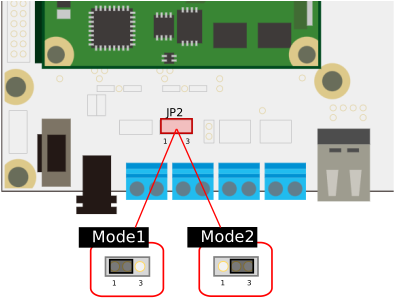
| Mode | Pin Connections | Description |
|---|---|---|
Mode1 (Default) |
1-2 |
Supplies power to VIN_A from CON17 |
Mode2 |
2-3 |
Supplies power to VIN_A from CON18 |
Power Input Switching Interface (VIN_B) (JP3)
JP3 is the interface to switch the power input for VIN_B between CON17 or CON19.
Connector: 10129378-903001BLF (Amphenol CS)
| Pin Number | Pin Name | Description |
|---|---|---|
1 |
5V |
Power supply (input from CON17) |
2 |
VIN_B_CM |
Power Supply (Common terminal connected to VIN_B) |
3 |
VIN_B_TRM |
Power Supply (Input from CON19) |
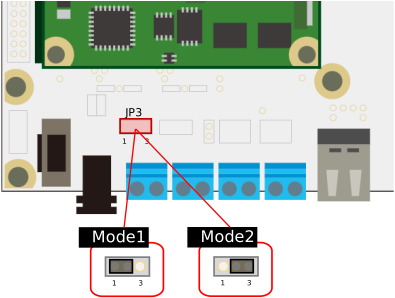
| Mode | Pin Connections | Description |
|---|---|---|
Mode1 (Default) |
1-2 |
VIN_B input supplied from CON17 |
Mode2 |
2-3 |
VIN_B input supplied from CON19 |
Power Input Switching Interface (VDD_UIO1) (JP4)
JP4 is the interface that allows power input for VDD_UIO1 to be selected from VDD_3V3_IO, VDD_3V3_DCDC, or CON20.
The default configuration of the Dev Board is set to VDD_3V3_IO via the jumper socket.
Connector: 10129381-906001BLF (Amphenol CS)
| Pin Number | Pin Name | Description | Pin Number | Pin Name | Description |
|---|---|---|---|---|---|
1 |
VDD_3V3_IO |
Power Supply (VDD_3V3_IO Input) |
2 |
VDD_UIO1_IN |
Power Supply (Common Pin Connected to VDD_UIO1) |
3 |
VDD_UIO1_IN |
Power Supply (Common Pin Connected to VDD_UIO1) |
4 |
VDD_3V3_DCDC |
Power Supply (VDD_3V3_DCDC Input) |
5 |
VDD_UIO1_TRM |
Power Supply (Input from CON20) |
6 |
VDD_UIO1_IN |
Power Supply (Common pin connected to VDD_UIO1) |
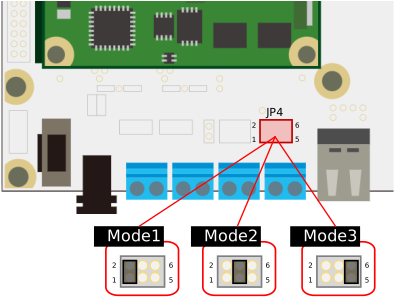
| Mode | Pin Connections | Description |
|---|---|---|
Mode1 (Default) |
1-2 |
Supplies power to VDD_UIO1 from VDD_3V3_IO |
Mode2 |
3-4 |
Supplies power to VDD_UIO1 from VDD_3V3_DCDC |
Mode3 |
5-6 |
Supplies power to VDD_UIO1 from CON20 |
Power Input Switching Interface (VDD_UIO2) (JP5)
JP5 is the interface that allows power input for VDD_UIO2 to be selected from VDD_3V3_IO, VDD_3V3_DCDC, or CON21.
The default configuration of the Dev Board is set to VDD_3V3_IO via the jumper socket.
Connector: 10129381-906001BLF (Amphenol CS)
| Pin Number | Pin Name | Description | Pin Number | Pin Name | Description |
|---|---|---|---|---|---|
1 |
VDD_3V3_IO |
Power (VDD_3V3_IO input) |
2 |
VDD_UIO2_IN |
Power (Common terminal connected to VDD_UIO2) |
3 |
VDD_UIO2_IN |
Power (Common terminal connected to VDD_UIO2) |
4 |
VDD_3V3_DCDC |
Power Supply (VDD_3V3_DCDC Input) |
5 |
VDD_UIO2_TRM |
Power Supply (Input from CON21) |
6 |
VDD_UIO2_IN |
Power (Common terminal connected to VDD_UIO2) |
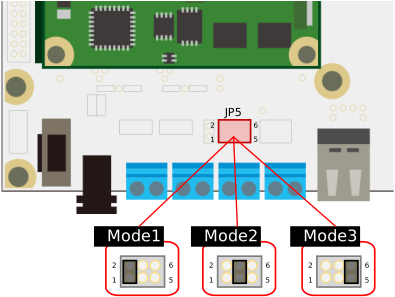
| Mode | Pin Connections | Description |
|---|---|---|
Mode1 (Default) |
1-2 |
Power supply to VDD_UIO2 provided from VDD_3V3_IO |
Mode2 |
3-4 |
Power supply to VDD_UIO2 provided from VDD_3V3_DCDC |
Mode3 |
5-6 |
Power supply to VDD_UIO2 provided from CON21 |
User Switch (SW1)
SW1 is the switch that controls the connection between the OBC and the following circuits:
-
High-Speed USB Bridge FT4232H-56Q (IC2)
-
User Temperature Sensor Circuit (User Temperature Sensor)
-
User-configurable LED circuit (User LED)
In the default configuration, only Bits 3 and 4 are ON; all other bits are OFF. Manually switch the bit that corresponds to the circuit you wish to use.
Use a pointed tool, like tweezers, as it is difficult to operate the switch with your fingers.
The signal line connecting the OBC to SW1 also branches out to the Universal Area. Please be careful when using signal lines connected to the above circuits in the Universal Area.
Parts mounted: 219-10MSTR (CTS Electrocomponents)
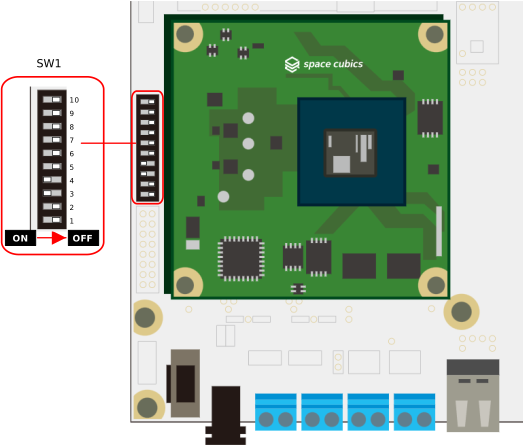
| Bit Number | Pin Number | Pin Name | I/O | Power Domain | Description |
|---|---|---|---|---|---|
1 |
1,20 |
TRCH_UART_RX / UIO4_10 |
Input |
VDD_3V3_SYS / VDD_3V3_IO |
Communication to TRCH UART via USB interface (CON2) (ON: Enable / OFF: Disable) |
2 |
2,19 |
TRCH_UART_TX / UIO4_09 |
Input |
VDD_3V3_SYS / VDD_3V3_IO |
|
3 |
3,18 |
UIO4_04 |
In/Out |
VDD_3V3_IO |
Communication to FPGA UART via USB interface (CON2) (ON: Enabled / OFF: Disabled) (※When FPGA UART is assigned to UIO4_03,04) |
4 |
4,17 |
UIO4_03 |
In/Out |
VDD_3V3_IO |
|
5 |
5,16 |
UIO4_02 |
In/Out |
VDD_3V3_IO |
Communication to CPU JTAG via USB interface (CON2) (ON: Enabled / OFF: Disabled) (※When CPU JTAG is assigned to UIO4_01,02) |
6 |
6,15 |
UIO4_01 |
In/Out |
VDD_3V3_IO |
|
7 |
7,14 |
I2C_EXT_SCL |
Output |
VDD_3V3_SYS |
Temperature data acquisition from user temperature sensor via external I2C (ON: Enabled / OFF: Disabled) |
8 |
8,13 |
I2C_EXT_SDA |
In/Out |
VDD_3V3_SYS |
|
9 |
9,12 |
UIO2_14 |
In/Out |
VDD_UIO2 |
Pull-down resistor (1kΩ) for UIO2_14 (ON: Present / OFF: Absent) |
10 |
10,11 |
UIO2_15 |
In/Out |
VDD_UIO2 |
User LED (LED11) control via UIO2_15 (ON: Enabled / OFF: Disabled) |
Main Power Input ON/OFF (SW2)
SW2 controls the EN pins of the power input protection circuits (IC11, IC12), providing an interface to connect or disconnect CON17~19 from VIN_A and VIN_B.
Moving the SW2 toggle toward the ‘ON’ side (as indicated by the silk screen on the Dev Board) connects the circuit; moving it toward the ‘OFF’ side disconnects it.
The default configuration is ‘OFF’.
Component: SSSF011700 (Alps Alpine)
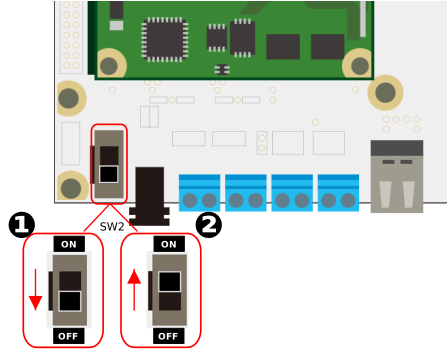
| Number | Name |
|---|---|
1 |
Turns the main power OFF. |
2 |
Turns the main power ON. |
Power Supply LEDs (LED1~8)
LED1~8 are status LEDs for each power supply. Illumination indicates a normal status.
Component: SML-D12M8WT86 (ROHM)
| Component Number | LED Color | Corresponding Power Supply |
|---|---|---|
LED1 |
Yellow-Green |
VIN_A |
LED2 |
Yellow-Green |
VIN_B |
LED3 |
Yellow-Green |
VDD_3V3_SYS |
LED4 |
Yellow-Green |
VDD_3V3_IO |
LED5 |
Yellow-Green |
VDD_3V3_DCDC |
LED6 |
Yellow-Green |
VDD_UIO1 |
LED7 |
Yellow-Green |
VDD_UIO2 |
LED8 |
Yellow-Green |
VBUS_A |
User LED (LED11)
LED11 is a user-programmable LED.
Component: SML-D12M8WT86 (ROHM)
| Component Number | LED Color | Description |
|---|---|---|
LED11 |
Yellow-Green |
Connected to OBC’s UIO2_15 via SW1 |
About VDD_UIO
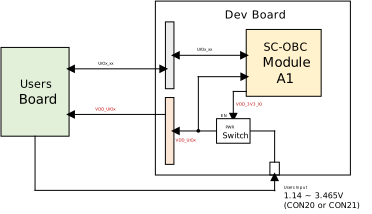
Any voltage can be applied to VDD_UIO1 and VDD_UIO2 for use.
However, the FPGA’s IO power supply must follow the FPGA power-up sequence. Applying voltage after VDD_3V3_IO goes High ensures compliance with the power-up sequence.
The Dev Board incorporates power switches (IC14, IC15) on the VDD_UIO lines to prevent applying FPGA IO voltage without adhering to the power sequence.
Furthermore, due to voltage and current capacity constraints on VDD_3V3_IO, JP4 and JP5 enable switching the power input to VDD_UIO between the following three patterns:
VDD_UIO = VDD_3V3_IO
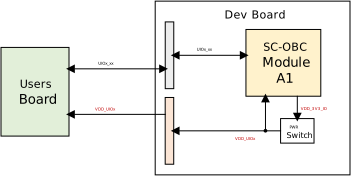
VDD_UIO = VDD_3V3_DCDC
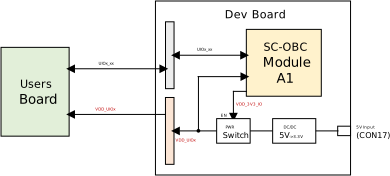
VDD_UIO = Block Terminal Input