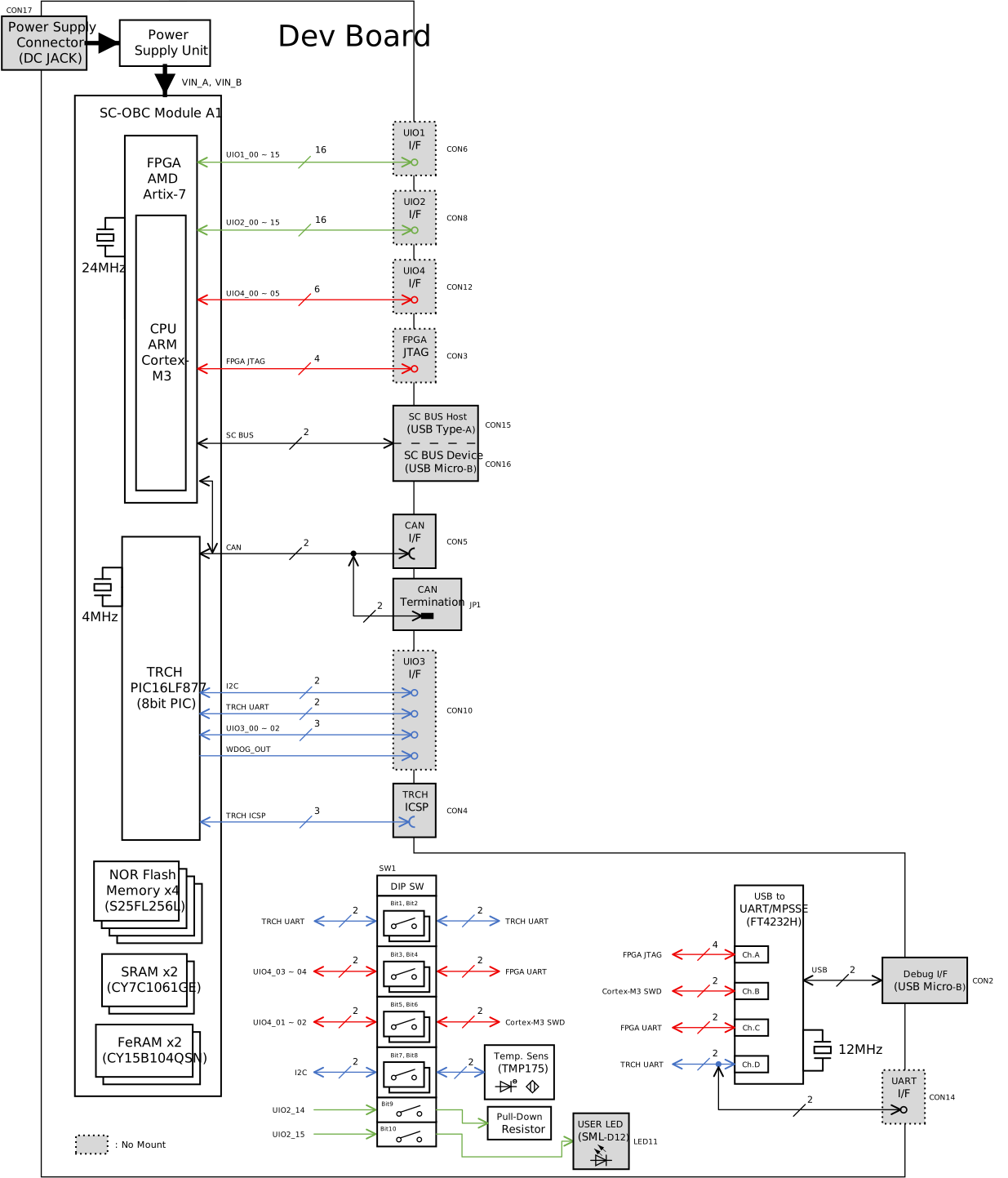
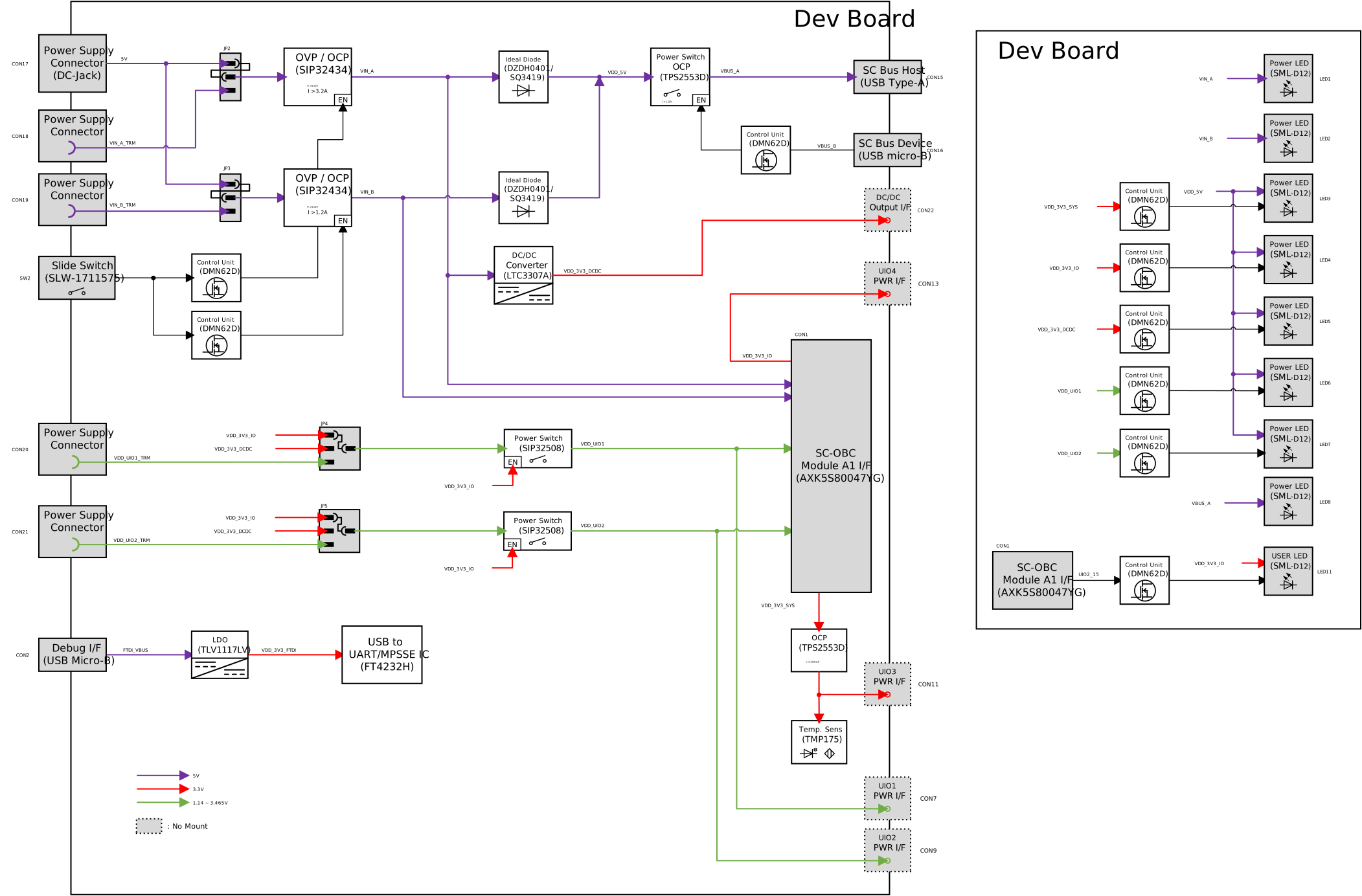
Product Overview
Specifications
| Feature | Description |
|---|---|
Interface |
OBC Interface x1 |
TRCH ICSP Interface x1 |
|
DEBUG Interface x1 (FPGA JTAG, CPU JTAG, FPGA Console, TRCH Console) |
|
FPGA JTAG Interface x1 |
|
UIO Interface x4 (UIO1 16-pin, UIO2 16-pin, UIO3 8-pin, UIO4 6-pin) |
|
CAN Interface x1 |
|
SC Bus Interface x2 |
|
Main Power Supply x3 (DC Jack x1, Block Terminal x2) |
|
UIO Power Supply x2 (Block Terminal x2) |
|
Power Output x4 (VDD_UIO1, VDD_UIO2, VDD_3V3_SYS, VDD_3V3_IO) |
|
Switch |
Slide Switch for Main Power Supply x1, User Switch x1 |
LED |
Power LED x8, User LED x1 |
Temperature Sensor |
User Temperature Sensor x1 (Texas Instruments TMP175) |
Power Supply |
DC 5V +/-5% |
Operation Temperature |
10~40℃ |
Protection |
Main Power Supply OVP (Over Voltage Protection) x2 |
VDD_3V3_SYS OCP (Over Current Protection) x1 |
|
SC Bus VBUS OCP (Over Current Protection) x1 |
|
ESD Protection (Each Terminal) |
|
Board Size |
200 x 130 mm |
Appearance
The appearance of the Dev Board is shown below.
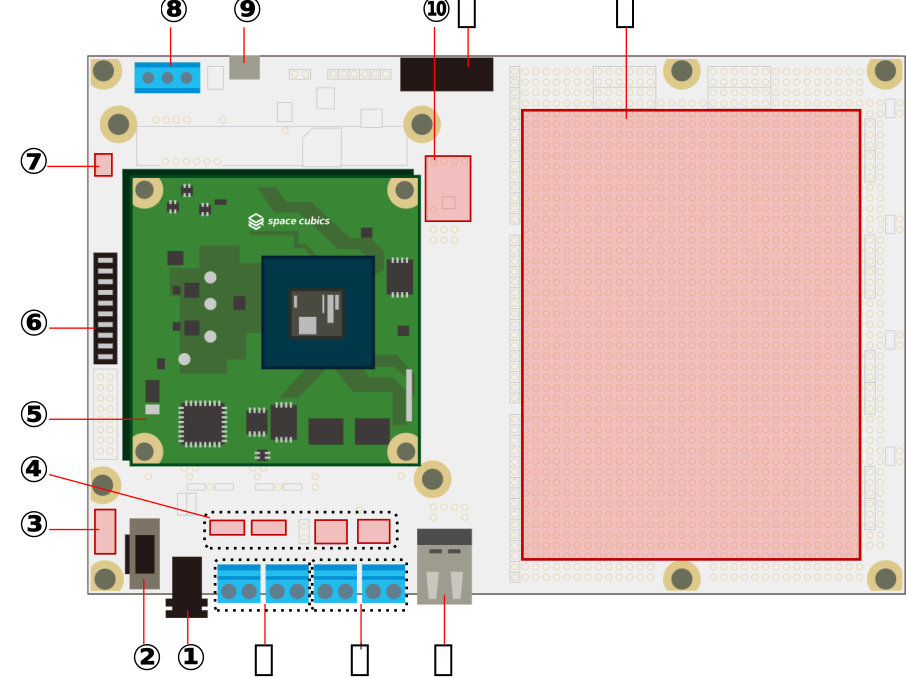
| Number | Part Name | Description |
|---|---|---|
1 |
Main Power Connector |
Connects the AC adapter. |
2 |
Power Switch |
Turns the main power ON/OFF. |
3 |
Power LED Indicator |
Indicates the output status of various power supplies. |
4 |
Power Selector |
Switches the input source for the main power and UIO power. |
5 |
OBC |
Allows mounting of the SC-OBC Module A1. |
6 |
User Switch |
DIP switch allowing users to freely configure functions. |
7 |
User LED |
Yellow-green LED available for user-defined use. |
8 |
CAN Connector |
Terminal block for connecting CAN communication cables. |
9 |
USB Connector |
Connects a USB Micro-B plug. Usable for FPGA JTAG, CPU JTAG, FPGA UART (Console), and TRCH UART. |
10 |
User Temperature Sensor |
A temperature sensor freely usable by the user. |
11 |
PICkit Connector |
Connects a Microchip PICkit. |
12 |
Universal Area |
Universal Area |
13 |
USB Connector |
Allows connection of a USB Type-A plug on the front and a Micro-B plug on the back. Can be used for SC Bus communication. |
14 |
UIO Power Connector |
A terminal block allowing the user to supply UIO power at any desired voltage. |
15 |
Main Power Connector |
A terminal block allowing the user to supply main power using a source other than the AC adapter. |