Design Flow
The development of the Versal on the SC-OBC Module V1 can be carried out in two ways: using the Vivado GUI or using the command-line flow with RTL and Tcl scripts.
The Makefile included in the development environment provides two main targets:
create_versal_ps_bd and build_versal.
The following diagram illustrates the primary development flow for the SC-OBC-V1 FPGA.
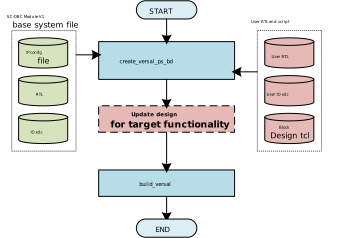
GUI Design Flow
This method uses the Vivado GUI for design work.
First, run the create_versal_ps_bd target, then open and modify the Vivado project as needed.
The project can be opened using the following commands:
cd versal/work/implement
vivado project/sc_obc_v1_versal.xpr
After completing the design in Vivado, close the application and run the build_versal target.
This will export the .pdi and .xsa files generated from your design.
|
When using this flow, running |
CLI Design Flow
This method uses RTL and Tcl scripts for design.
The create_versal_ps_bd target includes entry points for loading RTL files and executing user scripts.
The following files are provided for users to add RTL or Tcl-based design logic:
-
rtl/user_rtl.list Lists the user RTL files to be loaded by Vivado. Any RTL added to this file is automatically included during the build.
-
script/implement/user_bd_logic.tcl A Tcl script for applying custom logic to the Block Design hierarchy. This script is executed at the end of the Block Design generation process.
-
constraints/sc-obc-v1-versal-user-io.xdc Constraint file for user-defined I/O. Used to specify pin assignments, pad numbers, I/O buffer configurations, drive strengths, and other I/O-related settings.